Make great presentations, even without PowerPoint
Prezi is a versatile app that lets you make professional-looking presentations. It's like a free, pared-down version of PowerPoint.
Top Recommended Alternative

Minimal effort, maximum impact
Prezi lets you make presentations that are as casual or as professional as you want them to be. It allows you to add information to a prezi (the software calls each presentation "a prezi"), organize it in a logical way, embellish it with audio and video and then share it with the people you need to reach.
You can choose one of Prezi's many templates to get started, or just use a blank page. If it's your first presentation, pick a template - it makes it much easier to arrange the information you have in a logical way. Once you have the basics down, add images, video and voiceover, if you need them.
Once you've got a first version of your presentation, just click on the elements to edit them. When you click, you'll see all the options available to you, but you can do pretty much anything, from changing how it looks or where it is, to deleting it completely.
Down the left of the app, you'll see the path of your presentation. This is the order the app will zoom in to each part of yiour presentation, which makes it pretty important. If you don't pay attention, your Prezi won't make any sense.
A simple approach to a complex task
When you download Prezi, it automatically begins a trial of the Pro version. While this is an easy taster of the full product, it's hard to know what will be missing when the trial finishes. In basic terms, without upgrading, you'll have enough space to save a few prezis in the Prezi cloud, you'll be able to edit and share prezis and all your prezis will be public. There's more information on the Prezi website.
Prezi makes making a presentation very easy. The whole app flows very easily - even without looking at the intro or help, you can dive into a new presentation fairly competently. It is worth looking at the help and online resources to get the most out of it, but even taking Prezi in isolation, it's very usable.
A fresh approach to presentations
Before Prezi, there was PowerPoint, and to a large extent, that was it. PowerPoint is a great piece of software, don't get us wrong, but there was definitely room for a change. Prezi feels fresh and easy, but still produces nice-looking presentations. It's also capable of dealing with feature-rich and complex material, and making it look good. We thoroughly recommend it.
Changes
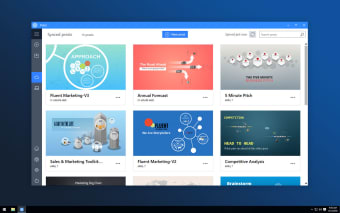
Prezi Desktop has been renamed and is now simply, Prezi! There is now a prezi folder hidden in the background where we store all of your prezis. This means that you no longer need to manage PEZ files when working with your prezis View all of your prezis on the new home screen You can download prezis you have created from prezi.com and upload them automatically after editing Import previous PEZ files Option to sync PEZ files with your online Prezi account
Most recently, Prezi has been improved with a new Favorite button to the Transformation Tool for easier access. There's also a My Content sidebar to allow you to easily use content from your previous Prezi creations. There are also some syncing fixes for content and templates.









.png)











.webp)
.webp)